



JR East’s tourist-only Suica app skips the ticket machines entirely, and it’s picked up two new tricks since launch
JR East launched the Welcome Suica Mobile App in early March 2025 for overseas visitors. Since then, it’s picked up two real features: ticketless Shinkansen reservations and in-app Green Car tickets. It’s still iPhone and Apple Watch only; no Android version exists, and it’s the fastest way to get a working Suica before you’ve even landed.
| Launched | March 2025, for overseas visitors only |
| Platform | iPhone (iOS 17.2+) and Apple Watch (Series 3+) only; no Android |
| Validity | 180 days from issuance |
| Registration or deposit | None |
| Top-up | Apple Pay only, foreign cards accepted |
| Since 1 October 2025 | Ticketless booking on select Shinkansen and limited-express trains |
| Since March 2026 | In-app Green Car (reserved seating) tickets on 10 local lines |
| Minimum age | 13 years |
JR East restricts app download and top-up by country for some nationalities, requiring you to wait until you’ve landed to add value. Travel guides covering the rollout report that Singapore isn’t affected, along with South Korea, Taiwan, Malaysia, Australia and Vietnam.
You should be able to set up and load your Welcome Suica Mobile before you fly. ⚠️ JR East’s own page doesn’t name the eligible countries. Double-check inside the app before you commit to a pre-flight setup.
Heading to Japan? Exchange and lock in the best JPY rates at zero fees with YouTrip! Our SGD to Yen guide breaks down how to capitalise on the rate before you convert.
📌 Table of Contents
- What Is the Welcome Suica Mobile App?
- How to Use the Welcome Suica Mobile App
- What’s Changed Since Launch
- Welcome Suica Mobile vs. Suica
- Best Use Case for Tourists
- FAQ: Welcome Suica Mobile App
What Is the Welcome Suica Mobile App?
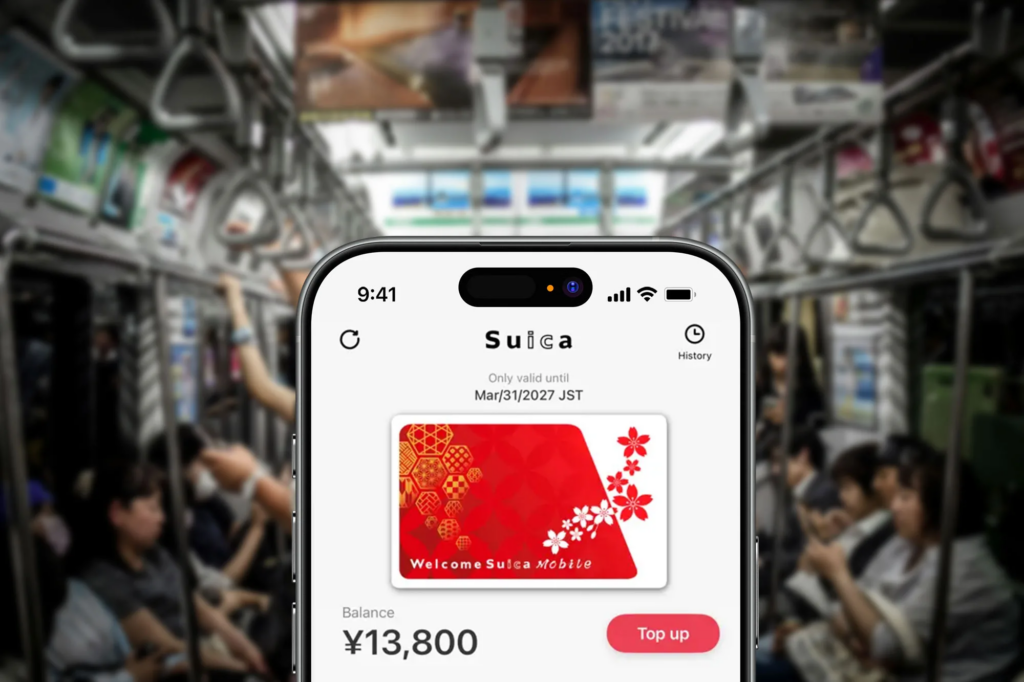
Image Credits: ps.travelshots
A digital Suica card that JR East built specifically for visitors, issued and managed entirely on your iPhone or Apple Watch. No vending machine, no ticket counter, and no deposit.
It runs for 180 days from issuance, well past the physical Welcome Suica card’s 28. And it now does more than tap-and-ride: Shinkansen reservations and Green Car tickets both live inside the same app.
Related Guide: Check out this Japan ATM Withdrawal Guide if you’re running low on cash.
How to Use the Welcome Suica Mobile App in Japan
Step 1: Download and Set Up (iOS Only)
Search “Welcome Suica Mobile” on the App Store, download it, and open it. No registration or personal details needed. Your virtual Suica is issued immediately.
Check your device first. JR East requires iOS 17.2 or later on an iPhone, or watchOS on an Apple Watch Series 3 or later. Older devices and any phone without Apple Pay can’t run the app. Android users need the physical Welcome Suica card instead. You must also be at least 13 years old to use it.
Step 2: Add Funds via Apple Pay
Tap “Charge” in the app and load funds with a card registered to Apple Pay. Minimum and maximum top-up amounts are shown on screen.
💡 Pro tip: top up with your YouTrip Mastercard for wholesale JPY rates and zero FX fees. Set it up in Apple Pay before you fly, since adding a card needs a working data connection.
Step 3: Tap to Ride
Tap your iPhone or Apple Watch on the IC card reader at any gate showing the IC mark, including JR East lines, subways, buses and most private railways.

💡 Pro tip: turn on Express Transit for your Welcome Suica card in the Wallet app (More → Card Details → Express Transit Settings). It lets you tap through gates without Face ID, Touch ID or a passcode. On iPhone XS and later, it also keeps working for up to five hours after your battery dies.
Step 4: Pay for Purchases
Use the same virtual Suica at 7-Eleven, Lawson, FamilyMart, vending machines and any retailer with the IC symbol. No cash, no separate wallet needed.
Step 5: Buy a One-Day Transport Pass
Tap “Buy a Pass” on the Suica tab, confirm the notes, pick a pass, and pay with Apple Pay (not your Suica balance).
The Tokyo Metropolitan District Pass (Tokunai Pass) is confirmed current on JR East’s own app pages.
⚠️ Note: the pass lineup rotates seasonally. Check what’s on offer before you fly, since passes can only be bought on the day you’ll use them, not in advance.
Step 6: Book a Shinkansen or Limited Express Seat
Since 1 October 2025, Welcome Suica Mobile links directly to JR-EAST Train Reservation. Book a reserved seat on the Narita Express, the Fuji Excursion, or the Tohoku, Hokkaido, Akita, Yamagata, Joetsu, or Hokuriku Shinkansen. The e-ticket syncs straight to your Suica ID, so there’s no paper ticket and no counter. Just tap the gate on travel day and take your seat.
Step 7: Tap to Board a Non-Reserved Shinkansen Seat
For lines outside that reservation system, use your remaining balance to board non-reserved JR East Shinkansen seats. Tap your device at the Shinkansen gate and take an open seat. No booking, no paper ticket, and the fare is deducted automatically based on your journey.
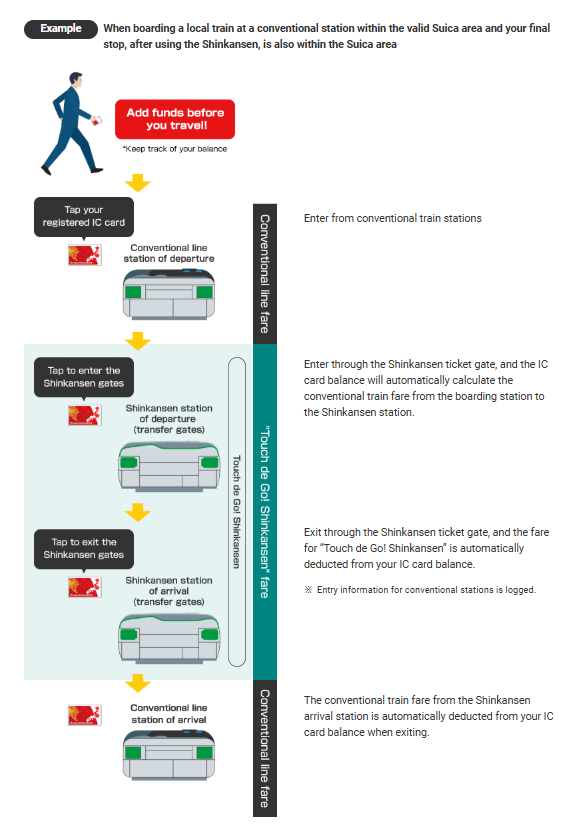
Image Credits: JR East
Regular Suica users can do this too, but only after a one-time registration at a ticket machine first — Welcome Suica Mobile skips that step entirely, since it’s already registered as a tourist product. That’s a real edge over the physical card, not just a convenience nicety.
Related Guide: taking the bullet train between cities? Our Tokyo to Osaka Shinkansen guide covers booking, seat classes and journey times.
Step 8: Buy a Green Car Ticket
Since March 2026, you can buy Suica Green Car tickets for reserved seating on local trains directly in the app. Per JR East’s own page, it covers 10 lines: the Tōkaidō, Yokosuka, Chūō (Rapid), Ōme, Takasaki, Utsunomiya, Jōban, Sōbu (Rapid), Shōnan–Shinjuku and Ueno-Tokyo lines. Buy the ticket before boarding, tap the gate, then tap your phone against the reader above your seat once you’re on. No ticket office needed.
Step 9: Use the Built-In Travel Tools
The app carries English-language route planners, transfer directions, and tourist attraction info, with real-time suggestions for getting between popular spots.
Related Guide: Planning the rest of your trip? Here’s our guide to 15 Best Things to Do in Shirakawago.
What’s Changed Since Launch
Three things are different from when this app first shipped in March 2025:
- Ticketless Shinkansen booking arrived on 1 October 2025. JR-EAST Train Reservation now links directly into the app, covering Narita Express, Fuji Excursion, and six Shinkansen lines.
- Green Car ticket purchases arrived in March 2026. You can now buy reserved seating on 10 local JR East lines without visiting a ticket office.
- Android still isn’t supported. Google Wallet carries Suica only on phones with Osaifu-Keitai (FeliCa) hardware, and Singapore-bought Android handsets almost never have it. That’s unchanged as of 2026.
JR East has said it plans to keep expanding the list of app-supported limited express trains, so this list will likely grow again before your next trip.
👉 Bottom line: if you used this app in its first year and stuck to tap-and-ride, you’re missing two features. Both save you a ticket-counter trip on Shinkansen days.
Welcome Suica Mobile vs. Suica
| Feature | Welcome Suica Mobile | Regular Suica |
|---|---|---|
| Platform | iPhone and Apple Watch only | Physical card, or virtual on iPhone and Apple Watch |
| Registration | No | No |
| Deposit required | No | No (500 JPY (~S$4), refundable) |
| Validity | 180 days from issuance | 10 years |
| Top-up method | Apple Pay only | Cash at machines, or Apple Pay if virtual |
| Stored fare refund | ❌ Not refundable | ✅ Refundable, minus a 220 JPY (~S$1.75) handling fee |
| Use on transport and at stores | ✅ | ✅ |
| Non-reserved Shinkansen boarding | ✅ Built in, no setup | ✅ After a one-time registration at a ticket machine |
| JR-EAST Train Reservation / Green Car | ✅ | ✅ (physical and virtual Suica also support this) |
| In-app travel info and navigation | ✅ | ❌ |
| Issue before arriving in Japan | ✅ | ✅ if added to Apple Wallet |
Two things worth knowing before you decide: stored fare refunds on a regular Suica aren’t a flat no, JR East refunds the deposit plus balance minus a small fee. And a regular Suica can board non-reserved Shinkansen seats too, it just needs that one-time registration step Welcome Suica Mobile was built to skip.
Best Use Case for Tourists
Welcome Suica Mobile fits best if you’re:
- Flying into Tokyo, Osaka, or Nagoya and want trains working the moment you land
- Skipping ticket lines and cash top-ups entirely
- Planning non-reserved Shinkansen travel, or now booking a reserved seat on the Narita Express or Fuji Excursion without a ticket counter
- Using Green Car seats on local JR East lines and not wanting to queue at a ticket office
- Looking for built-in route planning and attraction info in English
If you’re on Android, or staying longer than 180 days, take the physical route covered in our Suica Card Japan guide instead.
FAQ: Welcome Suica Mobile App
It’s JR East’s digital Suica for overseas visitors, launched in March 2025 for iPhone and Apple Watch. It issues instantly with no registration or deposit, and now also handles Shinkansen bookings and Green Car tickets.
No. It only runs on iPhone and Apple Watch, and that hasn’t changed since launch. Android users need a physical Suica or Welcome Suica card, since Google Wallet’s Suica support needs Osaifu-Keitai hardware most Singapore-bought phones don’t have.
180 days from the day you issue it, compared with 28 days for the physical Welcome Suica card and 10 years for a regular Suica.
Yes, two ways. Since October 2025, you can book a reserved seat on the Narita Express, Fuji Excursion, or select Shinkansen lines through the in-app JR-EAST Train Reservation link. You can also tap to board a non-reserved Shinkansen seat on eligible JR East lines with no booking at all.
Yes, since March 2026, for reserved seating on 10 local lines: the Tōkaidō, Yokosuka, Chūō (Rapid), Ōme, Takasaki, Utsunomiya, Jōban, Sōbu (Rapid), Shōnan–Shinjuku and Ueno-Tokyo lines. Buy it in the app before boarding, then tap your phone on the seat-back reader once you’re on.
Yes, through Apple Pay. A YouTrip Mastercard tops it up at wholesale JPY rates with no foreign transaction fee.
It’s usually the device. Confirm your iPhone runs iOS 17.2 or later (or your Apple Watch is a Series 3 or later) and has Apple Pay set up. If you’re travelling from a country where JR East restricts top-up until arrival, connect to Wi-Fi once you land and reopen the app.
Travel guides report Singapore isn’t on that restricted list, but confirm in-app since JR East doesn’t publish the country list itself.
Get the Best JPY Rates With YouTrip!

From touchdown to takeoff, the Welcome Suica Mobile App now handles trains, buses, Shinkansen bookings and Green Car seats, plus payments at convenience stores, all from your iPhone.
Not a YouTrooper yet? Singapore’s go-to multi-currency wallet helps you save with great FX rates and zero fees. Skip the money changer and get a free YouTrip card + S$5 YouTrip credits with code YTBLOG5.
Check out our YouTrip Perks page for exclusive deals, and join our Telegram (@YouTripSG) and Community Group (@YouTripSquad) for travel tips, event invites, and more.
Happy travels!
Related Japan Travel Guides
JR Pass 101: Everything You Need to Know About the Japan Rail Pass
teamLab Tokyo: Planets vs Borderless, Tickets & Tips
35 Best Things to Do in Tokyo