



Now with Groups for every trip. Track shared expenses and pay friends back in just a tap.
Someone always pays first. The dinner in Tokyo, the villa deposit in Bali, the cab ride to catch your flight. Then the trip ends, and the real work begins: spreadsheets, screenshots, and the group chat where everyone says “paying now” but only half actually do.
With YouTrip Split, you can now create a Group, tap any transaction in your app, and we’ll do the math for you. When it’s time to settle up, pay your friends back instantly without leaving the app.
And from 17 September to 14 October 2026, every qualifying Split could win your group a full trip refund. More on that below.
What’s New in YouTrip Split?
YouTrip Split now lets you settle faster in groups and pay friends back with fewer transfers.
- 🧾 Cash and non-YouTrip expenses – Created a Group? Add expenses paid outside your YouTrip card in SGD, so every spend stays accounted for.
- 👥 Groups – Create one group for every trip and keep all shared expenses in one place.
- 🧮 Simplified Payments – Settle the same amount with fewer transfers. We’ll calculate the easiest way for everyone to pay up.
Why Use YouTrip Split?
Most bill-splitting apps like Splitwise only do half the job. They help you track who owes what, but you’re still left to open another app, find your friend, key in the amount, and make the transfer yourself. Plus, when you want a little more functionality, you’re prompted to upgrade to a paid plan.
With YouTrip Split, everything happens in one place for free. Because splitting bills shouldn’t feel like a second job after your holiday ends.
1. Split Actual Expenses & Settle Directly In-app
Simply select any transaction(s) in your YouTrip app, choose which friends or family you’re splitting with, and the amount fills in automatically. No need to switch between apps to make a transfer or manually key in the amount.
From splitting the bill to settling up, everything’s done within the app. It’s accurate, fast, and most importantly, effortless.
2. Simplified Payments for Groups
Create a group for every trip and settle shared expenses with fewer transfers. Instead of everyone paying everyone back individually, we’ll calculate the simplest way to settle up so the same amount gets paid with less back-and-forth.
3. Settle Bills How They Were Paid
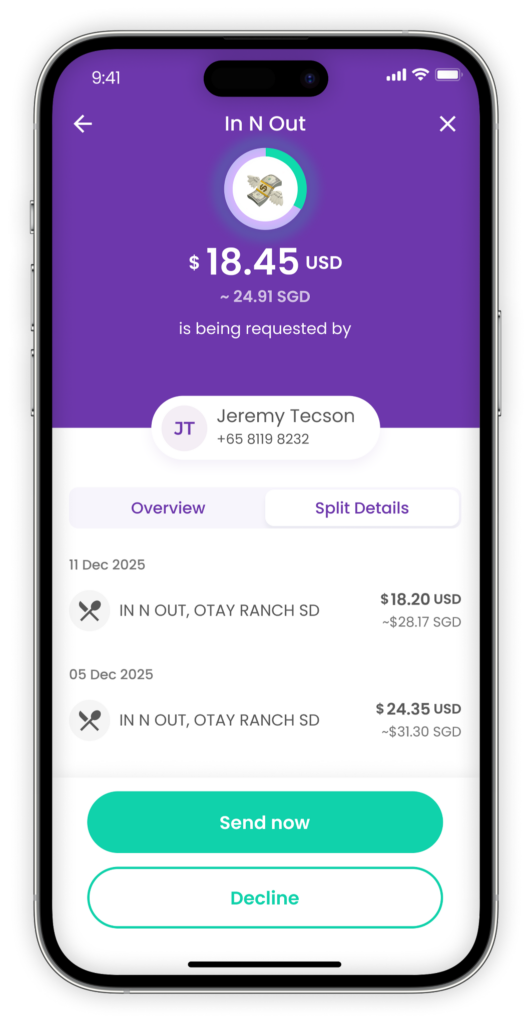
Settle a Split in the same currency charged, or in SGD*. Your choice. Whether it’s a dinner bill in Japan or a shared taxi in Thailand, your balances update automatically with the best exchange rates.
*Available for supported wallet currencies only, including: SGD, JPY, MYR, THB, USD, EUR, GBP, HKD, AUD, NZD, CHF, SEK
How to Use YouTrip Split
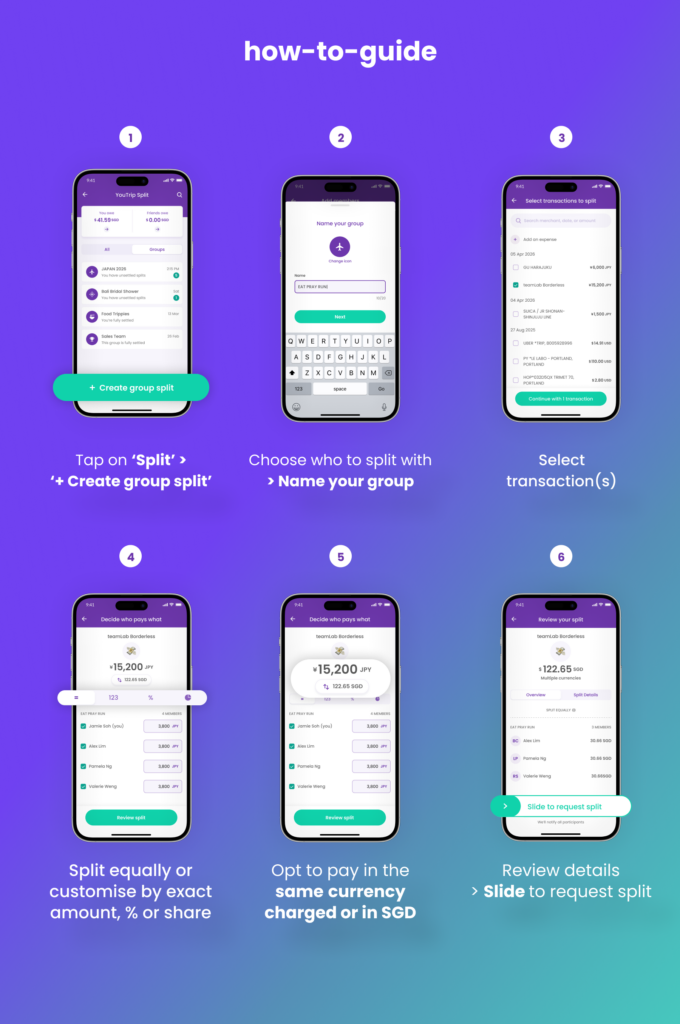
- Tap on ‘Split’ > ‘+ Create group split’
- Choose who to split with > Name your group
- Select transaction(s)
- Choose to split equally or customise by exact amount, percentage, or share
- Opt to pay in the same currency charged or in SGD.
- Review details > Slide to request split
There you have it, you’ve created a Group Split! 🎉
Got questions? Tap here.
🏝️ Split Your Bills, Win Your Trip Back

From 17 September to 14 October 2026, every qualifying Group Split earns your group a chance to get your entire trip refunded.
How to Qualify
- Click ‘Join now’ via the Promo banner in your YouTrip app
- Create a YouTrip Group Split with at least 3 people in total
- The more friends in the split, the more entries your group gets
At the end of the campaign, 3 winning Group Splits will be drawn, and each winner’s group’s trip expenses will be fully refunded, capped at S$5,000 per group.
FAQs
No, your friends don’t need a YouTrip account to join a Split. Only the person creating the Split needs to be a YouTrip user. Non-YouTrip users can settle their share separately, and you can mark it as paid in the YouTrip app.
But of course, signing up for YouTrip lets them enjoy the convenience of splitting and settling bills all in one app 😉
Yes. If you’ve created a Group, you can manually add cash expenses and other shared spends that weren’t charged to your YouTrip card. These expenses can only be added in SGD.
You can settle in SGD or any supported wallet currency. This allows you to pay back friends in the same currency the expense was originally charged in.
No. Splitting and settling expenses within the YouTrip app is completely free.
Most bill-splitting apps help you track expenses. YouTrip Split helps you track and settle them.
You can split actual card transactions, settle instantly within the app, and pay back friends in the original currency — all without switching between apps.
The Easiest Way To Settle Up
Shared expenses shouldn’t outlive the trip. Split as you spend and settle before you land. With YouTrip Split, everything happens in one place — from tracking expenses to paying friends back.
Enjoy simpler group spending, wherever you travel.