An international money transfer can carry four costs, and the exchange rate gap doesn’t appear as a fee
An international money transfer is a payment from your company’s account to an account in another country, usually converted into a different currency on the way. Singapore businesses send them four main ways: a bank telegraphic transfer, a transfer from a multi-currency business account, a card payment, or a money transfer operator.
A transfer can carry a fee and an exchange rate margin. The margin doesn’t show up as a fee, so compare how much your recipient receives with what you sent.
For most companies, the payments are overseas supplier deposits, contractor payouts, annual software plans billed by invoice, and top-ups for a regional subsidiary. Each payment can lose money to the exchange rate, and the loss adds up when your finance team sends several a month.
Quick Answers: What It Is, Four Ways to Send, Costs, Timing, Limits and Safety
| Question | Short Answer |
|---|---|
| What is an international money transfer? | A payment from your account to an account abroad, usually in another currency. It runs through banks, a transfer provider, or your card. |
| How can a business send one? | By bank telegraphic transfer, by a transfer from a multi-currency business account, by card, or through a money transfer operator. |
| What does it cost? | A sending fee, possible intermediary bank fees, possible receiving-bank charges, and the gap between the rate you get and the mid-market rate. |
| How long does it take? | A bank transfer usually takes a few days, and DBS says 1 to 4 days. How long it takes depends on the route, the cut-off time and the recipient’s bank. |
| Is there a limit? | Banks and providers set their own. YouBiz overseas transfers have per-transaction limits by currency, for example, up to 500,000 USD (~S$650,000). |
| Is it safe? | Yes, with a provider licensed by MAS and payee details you’ve confirmed yourself. Check the licence in the MAS Financial Institutions Directory. |
Take a S$10,000 payment as an illustration. If the rate you’re given is 2% worse than the mid-market rate (the rate banks use between themselves, which you’ll see on Google or XE), that gap costs S$200. A flat bank fee of around S$20 to S$30 looks small beside it. More than 10,000 finance teams use YouBiz, which charges no FX fees on overseas transfers or card spend.
Table of Contents
- How Does an International Money Transfer Work?
- What Do You Need to Send Money Overseas?
- What Does an International Money Transfer Cost?
- Which Way of Sending Money Abroad Is Right for Your Business?
- How Long Does an International Money Transfer Take?
- Is There a Limit on How Much You Can Send?
- Is It Safe to Send Money Overseas?
- How Do You Send an International Money Transfer?
- Popular Routes From Singapore
- FAQs
How Does an International Money Transfer Work?
An international money transfer works by sending payment instructions between banks, so no cash physically crosses a border. Your account is debited at one end, and the recipient’s account is credited at the other.
The banks a payment passes through differ by provider, and that changes what you pay. Our remittance guide explains the term.
How a Bank Sends the Payment: SWIFT and Intermediary Banks
A bank sends your payment as a message over SWIFT, the network banks use to talk to each other about payments. If your bank and the recipient’s bank don’t hold accounts with each other, the payment can pass through one or more intermediary (correspondent) banks. An intermediary bank can deduct a fee, and the transfer time can vary.
Payments in US dollars can be routed through a US bank. For example, OCBC lists JP Morgan Chase Bank, New York as the intermediary for US dollar payments into its accounts. Your bank also converts at its own rate. Our telegraphic transfer guide walks through the full fee stack and the charges at DBS, OCBC and UOB.
A wire transfer is the bank version of an international money transfer, and “telegraphic transfer” and “telex transfer” are older names for the same thing. “International money transfer” is the wider term, and it also covers transfers from a business account and money transfer operators.
How Local-Payout Providers Send the Payment
Local-payout providers keep money in accounts in several countries. When you send a payment, they pay your recipient from their own local account in the destination country instead of moving your money abroad. That skips the intermediary banks and their fees, but the provider’s own rate and fee don’t go away.
What Do You Need to Send Money Overseas?
You need the recipient’s exact name, their account number or IBAN, their bank’s SWIFT/BIC code and the payment currency. A missing detail can bounce the transfer back days later, which is a problem when a supplier is waiting on cleared funds.
- The recipient’s name exactly as it appears on the invoice. The bank matches the name to the account, so “ABC Trading” and “ABC Trading Co. Ltd” aren’t the same.
- The account number, or an IBAN for Europe and the UK. DBS and POSB state that they don’t have an IBAN. Our IBAN guide shows what one looks like and how to check it.
- The bank’s SWIFT/BIC code. It identifies the bank, like a postal code for banks. Our SWIFT/BIC code guide explains the format, and the bank-specific pages cover DBS and POSB, UOB and OCBC if you’re receiving money into those accounts.
- The payment currency and amount. Use the currency on the invoice where you can.
- A purpose of payment. Some banks ask for one, and UOB says it should be clear and specific, for example “Payment for legal services”.
Check any change of bank details before you pay. An email saying a supplier’s bank has changed is a common scam, so confirm it by phone first, as the safety section explains.
What Does an International Money Transfer Cost?
An international money transfer can cost a sending fee, intermediary bank fees, receiving-bank charges and the exchange rate gap. Only the sending fee is reliably shown upfront, so the other three are easy to miss when you compare quotes.
The sending fee: What your bank or provider charges to send the payment. A bank usually splits it into a commission and a cable fee, which our telegraphic transfer guide tabulates for DBS, OCBC and UOB.
Intermediary bank fees: What the banks in the middle charge to pass the payment along. You often don’t know the amount until it’s deducted, so the recipient can receive less than you sent.
Receiving-bank charges: Some recipient banks deduct a fee for an incoming payment. If a supplier says they received less than the invoice, ask them to check for this deduction first.
The exchange rate gap: The difference between the rate you’re given and the mid-market rate. It never appears as a line item, which is why it’s the cost most teams miss. In the S$10,000 example above, a 2% gap is S$200.
A worked example: On a S$10,000 payment sent through DBS IDEAL, DBS’s published business charges are a 1/8% commission (S$12.50, inside its S$10 minimum and S$120 maximum) and a S$20 cable charge. That’s S$32.50 in total, and DBS says fees from agent and overseas banks aren’t included in it. At a 2% rate gap, the exchange rate costs S$200 on the same payment, about six times the DBS charges.
How to Work Out the Exchange Rate You Get
A zero-fee transfer at a poor rate can cost more than a flat-fee transfer at a good one, so work out the rate you’re actually getting.
- Look up the mid-market rate on Google or XE just before you send.
- Divide the amount your recipient will receive by the amount you send. The result is the rate you’re really getting.
- Compare that rate with the mid-market rate. The gap is your exchange rate cost, on top of any flat fees.
Watch for first-transfer promotions: A promotional rate on a first transfer can look much better than the rate on the second. Check what the ongoing rate is before you move your regular payments.
Pay in the recipient’s currency when you can. A euro invoice paid in euros avoids the supplier’s bank converting it at its own rate. Our exchange rates guide explains how YouBiz converts when you do need to.
Which Way of Sending Money Abroad Is Right for Your Business?
Use a card for vendors that take cards, a transfer from a business account for regular bank payments, and a bank telegraphic transfer for routes your bank already handles. Which one fits depends on how each payee accepts payment.
| Method | Best for | What you pay | Watch for |
|---|---|---|---|
| Bank telegraphic transfer | Payees that only take bank payments, on routes your bank already handles | A sending fee, possible intermediary fees and an exchange rate margin | Daily cut-off times, and a payment that can arrive short |
| Transfer from a multi-currency business account (YouBiz) | Regular supplier and contractor payments in 19 supported currencies | No FX fees, converted at wholesale rates, plus a remittance fee that varies by tier and is shown before you send | An intermediary or receiving bank may still deduct its own fee |
| Business card | Vendors that take cards, such as software, ad platforms and online suppliers | 0% FX fees on card spend in 150+ currencies, with 1% cashback on eligible spend | Some merchants and payment wallets are excluded from cashback |
| Money transfer operator | Sending cash to individuals who don’t have a bank account | The operator’s own fee and rate | Whether the cap covers an invoice-sized payment |
Pay by Card When the Supplier Takes Cards
A business card is usually the cheapest way to pay a vendor that accepts one. YouBiz cards spend in 150+ currencies at 0% FX fees.
Card spend is converted at the Mastercard wholesale rate, which closely tracks the mid-market rate, and our Help Centre puts the typical difference at 0.1 to 0.4%. Eligible spend earns unlimited 1% cashback.
What to know about cashback: Payments to payment wallets and remittance platforms, including PayPal, don’t earn cashback. The exclusion list is non-exhaustive and can change, so check our Help Centre before you rely on it for a particular merchant.
Send a Transfer When the Supplier Only Takes Bank Payments
For a supplier that invoices and expects a bank payment, you send the money from your business account as an overseas transfer. YouBiz supports overseas transfers in 19 currencies to recipients in 150+ countries, with no FX fees and a remittance fee that varies by tier. Batch transfers take up to 1,000 payments in one file upload. Our guide to paying overseas suppliers compares the routes for larger payments.
Best for: Finance teams that pay the same overseas suppliers and contractors every month, where the exchange rate gap adds up fastest.
How Long Does an International Money Transfer Take?
A bank transfer usually takes a few days, and DBS says the beneficiary should receive the funds within 1 to 4 days, depending on the country or bank. How long it takes depends on the route, the daily cut-off time and the recipient’s bank.
- The route: A payment that passes through intermediary banks can take longer than one that doesn’t.
- The cut-off time: Banks set a daily cut-off time, and it can differ by currency. OCBC says a transfer authorised after the cut-off takes the next working day as its value date, so a Friday afternoon miss typically means a Monday start.
- Holidays at either end: A public holiday in the recipient’s country delays the credit, even if it’s a normal working day in Singapore.
- The details: A wrong beneficiary name or account number is a common reason a payment fails or comes back late.
What can hold up a YouBiz transfer: Incorrect account details, insufficient funds, or an approval policy that’s waiting on an approver. If a payment hasn’t gone out, check with your Admin or Finance team.
Tracking a payment: If your recipient can’t find a bank payment, ask your bank for the SWIFT payment confirmation, known as an MT103. On YouBiz, you can opt for a payment advice document during the transfer and send it to the recipient.
Is There a Limit on How Much You Can Send?
Yes, your bank or provider sets the limit. On YouBiz, overseas transfers have a per-transaction limit that varies by currency, for example, up to 500,000 USD (~S$650,000).
A 50,000 USD payment is well within that limit. For a larger payment, split it into more than one transfer. You’ll see the allowed range for your currency before you confirm the transfer. Our FX transfers page lists the limits for each supported currency.
Expect questions on larger payments. MAS requires licensed payment providers to pay special attention to unusually large or unusual patterns of transactions, so a provider may ask about the purpose of a payment or where the funds come from. That’s routine due diligence, and a normal supplier payment clears once you answer.
Is It Safe to Send Money Overseas?
Yes, if the provider is licensed by the Monetary Authority of Singapore (MAS) and you’ve confirmed the payee’s details yourself. Two checks matter most: the licence and the payee.
Check the licence: Cross-border money transfer is one of the seven payment services regulated under the Payment Services Act. MAS issues three licence types: money-changing, standard payment institution and major payment institution. The MAS Financial Institutions Directory lets you search for them. Confirm the company name, the licence type and that the licence covers the service you’re using.
Check the payee: The common scam is an email “from a supplier” saying their bank details have changed. The Singapore Police Force advises employees to treat requests to change a vendor’s bank account details as a red flag and to verify them through a different medium. Phone the supplier on a number you already have before you pay.
Add an approval step for large payments: On YouBiz, an Admin can set up to two approval steps, so designated approvers sign off before a transfer goes out.
YouBiz is a Principal Member of Mastercard and a major payment institution licensed under the Payment Services Act by MAS. Customer money is held in a dedicated customer segregated account with OCBC Bank, separate from YouBiz’s own company accounts.
How Do You Send an International Money Transfer?
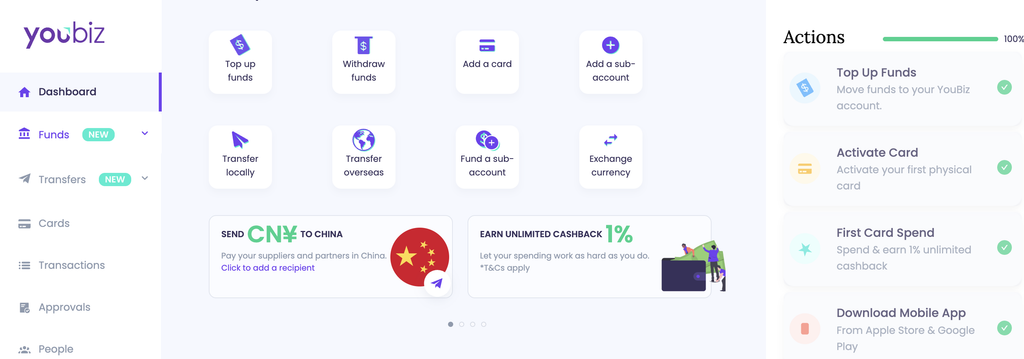
You send an international money transfer from the YouBiz Dashboard in five steps. The YouBiz app also supports overseas transfers.
- Open ‘Send Money’ in the YouBiz Dashboard
- Choose ‘Overseas Transfer’
- Select an existing recipient or add a new one
Including name, account number or IBAN and SWIFT/BIC code from the invoice.
- Enter the amount and choose the currency
Use the currency on the supplier’s invoice where you can.
- Verify every detail, then send
Check the beneficiary name and account number against the invoice, because a mismatch is a common reason a transfer fails.
Our multi-currency business account comparison shows how the accounts line up if you’re still choosing one.
Popular Routes From Singapore
YouBiz sends in 19 currencies, including CNY, MYR, IDR, INR, JPY, EUR, GBP, AUD and USD. Recipients can be in 150+ countries.
- China (CNY): Our CNY remittance page covers the route. Beneficiary names must be in English or PinYin characters.
- Southeast Asia (MYR, IDR, PHP, VND): VND transfers go to individual recipients only.
- North and South Asia (JPY, KRW, HKD, INR, LKR): Choose any of them as the transfer currency and the steps stay the same.
- Europe, the Americas, Australia and Turkey (AUD, BRL, CAD, CHF, EUR, GBP, TRY, USD): You can pay suppliers in each of these currencies directly.
How Do You Receive an International Transfer in Singapore?
On YouBiz, open the sub-account you want to fund, click Add Funds, then choose Bank Transfer and View Account Details. Copy the account details and Payment Code and give them to the sender, who pastes the Payment Code into the reference field.
The same details work for payments arriving from Malaysia, India or anywhere else. YouBiz doesn’t charge for incoming payments. A fee is deducted only if your sender chooses for you to bear the transfer fees. A sender’s intermediary bank may also deduct its own fee, and we can’t control that.
If you’re receiving into another bank account, give the sender its SWIFT/BIC code, your account number and the exact account name. DBS and POSB state that they don’t have an IBAN, so a sender paying those accounts doesn’t need one.
FAQs
It depends on the amount, the currency and how the recipient is paid, so work out what the recipient actually receives. Paying in the recipient’s currency avoids a second conversion. With YouBiz, card spend and overseas transfers carry no FX fees.
Add the recipient once, then send from the Dashboard in five steps: Send Money, Overseas Transfer, recipient, amount and currency, and verify. Saved recipients make repeat supplier payments quicker, and an approval policy means a second person checks larger payments before they go out.
There’s no single best. The right one depends on how your payee accepts payment. Use a card where the vendor takes one, and send a transfer from your business account for regular bank payments. Keep a bank telegraphic transfer for routes your bank already handles.
Only to a payee who has a PayPal account, and PayPal sets its own fees and exchange rates, so check them before you send. Payments to PayPal from a YouBiz card also don’t earn 1% cashback, because payment wallets are on the excluded list.
A wire transfer is the bank version. “International money transfer” is the wider term and covers bank wires, transfers from a business account and money transfer operators. Telegraphic transfer and telex transfer are older names for a bank wire.
A bank transfer usually takes a few days. DBS says the beneficiary should receive the funds within 1 to 4 days, depending on the country or bank. The route, the daily cut-off time, public holidays at either end and the recipient’s bank all affect it. A wrong beneficiary name or account number is a common reason a payment is delayed.
Usually yes, because limits depend on your bank or provider. On YouBiz, a 50,000 USD overseas transfer sits well inside the 500,000 USD per-transaction limit, and the allowed range is shown before you send. Large payments may prompt questions about the payment’s purpose.
Add the recipient’s name, account number or IBAN and SWIFT/BIC code, choose the currency and send it as a telegraphic transfer or an overseas transfer. Check every detail against the invoice first, because a wrong detail can bounce the payment back days later.
Pay Overseas Suppliers and Contractors Without FX Fees

An overseas supplier deposit, a contractor payout or a software invoice each costs more than the fee on the quote when the exchange rate carries a margin. Comparing the amount received, paying in the recipient’s currency and using a card where the vendor takes one are the three habits that remove most of it.
YouBiz gives your company a multi-currency business account with S$0 monthly fees, unlimited 1% cashback on eligible spends and real 0% FX fees on card spend. You can send overseas transfers in 19 currencies to recipients in 150+ countries with no FX fees.
Apply for a YouBiz account in under 5 minutes via Singpass. We review your application and email you within 1 to 2 business days. Virtual cards can be used as soon as they’re created, and physical cards arrive in 5 to 7 business days. For deeper detail, see our multi-currency business card comparison for how the cards line up.
This guide is written and maintained by the YouBiz content team and checked against YouBiz’s overseas transfer page and Help Centre, the MAS Financial Institutions Directory and the Singapore Police Force’s advisory on business email compromise, linked throughout. We revise it when transfer limits, supported currencies or MAS licensing rules change, and this version reflects them as of November 2026.